I am on a good edge session! This some top tier ass!
1 Like
Send the vid
Try handbrake to lower file size without compromising quality, you’ll have to give it time so better leave it the whole night doing its thing and check back next day. After editing it try cutting out the video in parts for easier sharing
3 Likes
Please and thank you XD
1 Like
Def gonna need that vid, wow. I can help too with edits.
1 Like
ps: If you prefer using handbrake or other methods, take a slice of a few seconds from the video to test the conversions first, when you are satisfied use real one, it can take a long time.
FFMPEG:
- Open the terminal on the video folder.
- Check if you have ffmpeg with: ffmpeg -h
- If not, install ffmpeg. Search how to do it on your system.
- If on windows 11, you can install with: winget install ffmpeg
PARAMETERS:
- -i input.mp4: filename, replace with yours.
- -vf “delogo=x=1600:y=1000:w=320:h=80”:
- removes the logo.
- x and y are the top-left coordinates of the watermark or logo
- w and h are the width and height of the area to blur.
- -c:v libx265: Encode video using HEVC. If libx265 does not work, use libx264.
- -crf 25: Controls quality. Lower means better quality, but higher file size. Range: 18 (high) to 30+ (low). If the value is too small, the file may become bigger instead of smaller.
- -preset medium: Affects speed/efficiency tradeoff. Options: ultrafast, superfast, veryfast, faster, fast, medium, slow, slower, veryslow.
- -c:a copy: Copies the original audio without re-encoding.
COMMANDS
Remember to adjust the watermark/logo area and the -crf, use libx264 if libx265 fails.
Take the first 15s to test the next commands on it, when you are satisfied with the size/quality use the real video.
ffmpeg -i input.mp4 -ss 0 -to 15 -c copy output.mp4
Remove the logo and change quality in one command:
ffmpeg -i input.mp4 -vf "delogo=x=1600:y=1000:w=320:h=80" -c:v libx265 -crf 25 -preset medium -c:a copy output.mp4
OR if the previous delogo is not good enough:
ffmpeg -i input.mp4 -filter_complex \
"[0:v]boxblur=luma_radius=10:luma_power=1[blurred]; \
 [0:v]crop=320:80:1600:1040[cropped]; \
 [blurred][cropped]overlay=1600:1000" \
-c:v libx265 -crf 25 -preset medium -c:a copy output.mp4
IF you want to SPLIT in smaller parts (-segment_time is in seconds, 300=5min):
ffmpeg -i input.mp4 -f segment -segment_time 300 -c copy output_%03d.mp4
13 Likes
Phenomenal ass
@tornflower dawg i need it
Thanks for sharing this info. I’ve been using ffmpeg and never even considered to trim it before doing a full pass as it does take a long time lol. Forgot all about handbrake so I may give it ago.
3 Likes
Thank you all for the feedback and please give thanks to @someguy2 for taking the time to edit the video for us all. Here it is!
https://
go file. io/d/JSNABu
85 Likes
Damn! Be ready for the 6.4gb file folks!!!
5 Likes
Need this vid !
It went up to 11gb when I tried to edit it  and the original file was 5gb
2 Likes
I have gotten it down to 800mb but honestly I thought it lost too much quality. I am doing another export and will work to reduce it as 6gb+ is just a biiiit too much
If anyone needs to download a smaller version
gofile / 8qxc6r
13 Likes
Respectfully,
go file. io / d / 8qxc6r
46 Likes
1 Like
Do you think the girl filmed herself? Because at the end of the video there are such shots, obvious, with shaking right on camera
Plus 29 minutes of close-up footage
3 Likes
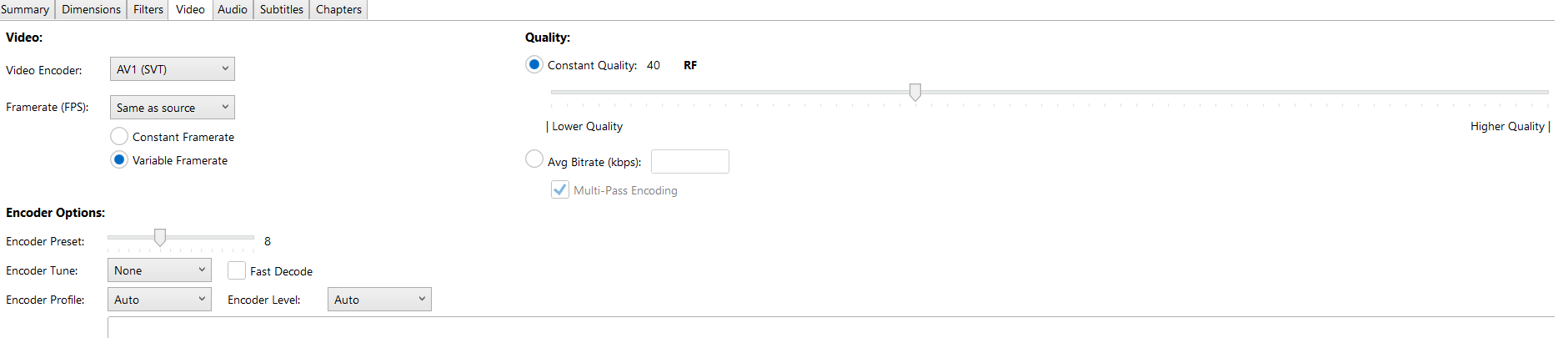
use this setting(follow the parameters exactly) ,av1 is more efficient than x265 and it produces a smaller file while preserving 95% of the video quality, will take longer to encode because its not using hardware acceleration
2 Likes
Truly S TIER!!! Sheesh
1 Like
I use InShot right on my phone, add a blur or watermark and the file size doesn’t go up like that. That’s crazy